Your Vault
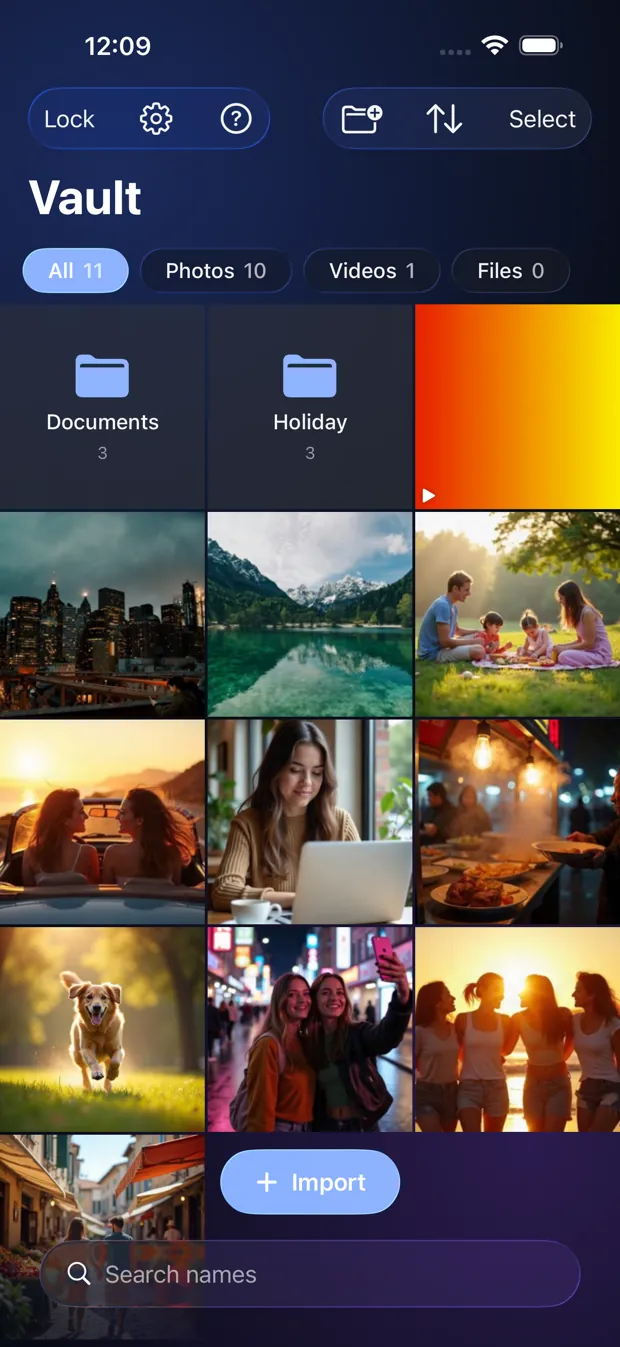
Everything you keep lives here: photos, videos and documents, decrypted only while you look at them.
Step by step
- Tap Import to add from Photos, Files, the camera or the document scanner.
- Use the All, Photos, Videos and Files chips to filter. Search finds names.
- Tap Select to pick items, then Move, Share or Delete. Long-press an item for a quick Move or Delete.
- Tap an item to open it.
Good to know
- An empty Vault says “Nothing here yet”. A new Vault looks the same.
- The free app has one Vault with up to 10 items. Pro removes the limit.
Other topics
- Welcome to StrongRoom
- Choose how to unlock
- Your recovery phrase
- Unlocking
- Forgot your unlock?
- Your Vault
- Folders
- Viewing items
- Settings
- Change your unlock
- More than one Vault
- Duress Vault
- Recovery PIN
- Export and restore
- Share items
- Open a Share Package
- StrongRoom Pro
Coming to the App Store. See what version 1.0 includes.