Share items
Send chosen items as an encrypted file. You give the other person the way to open it separately.
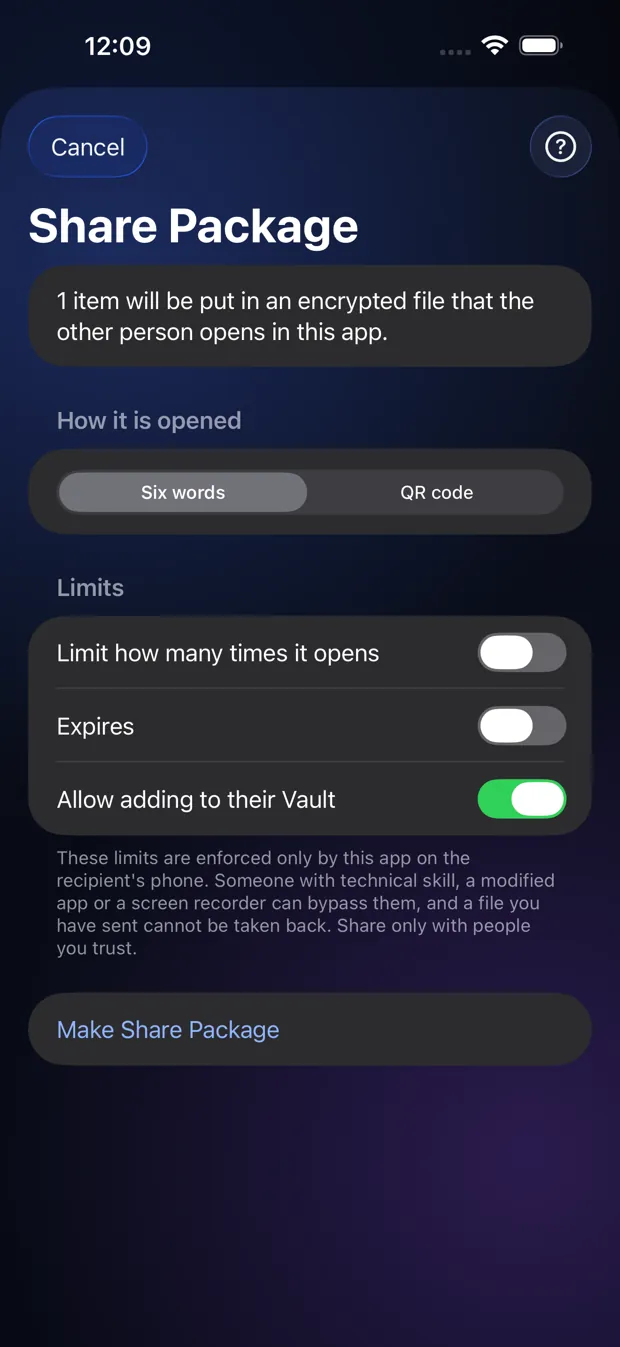
Step by step
- Tap Select, pick items, then Share.
- Choose Six words or a QR code, and optionally limit how many times it opens or set an expiry date.
- Tap Make Share Package, then send the file.
- Give the other person the six words or QR code another way, not in the same message.
Good to know
- The limits are enforced by StrongRoom on the other person’s phone. Someone determined could get around them, so share only with people you trust.
- A file you have sent cannot be taken back.
Other topics
- Welcome to StrongRoom
- Choose how to unlock
- Your recovery phrase
- Unlocking
- Forgot your unlock?
- Your Vault
- Folders
- Viewing items
- Settings
- Change your unlock
- More than one Vault
- Duress Vault
- Recovery PIN
- Export and restore
- Share items
- Open a Share Package
- StrongRoom Pro
Coming to the App Store. See what version 1.0 includes.