Your recovery phrase
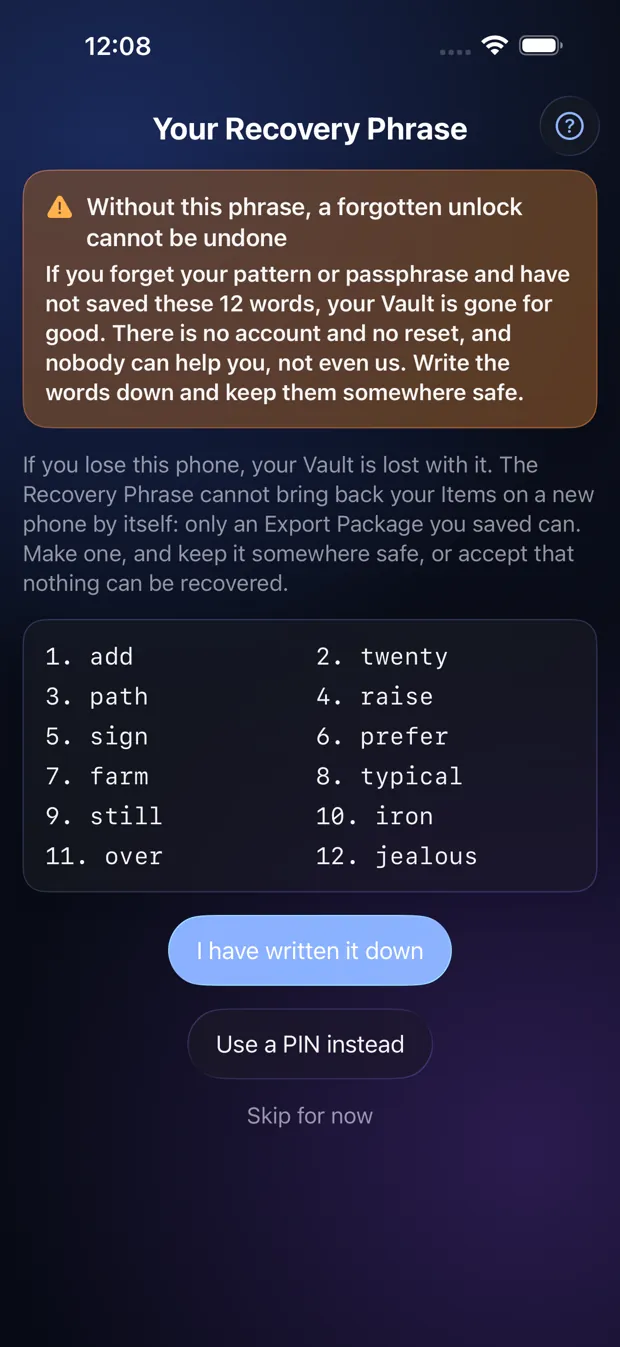
Twelve words that get you back in if you forget your unlock. They are shown once, so write them down.
Step by step
- Write the 12 words on paper, in order. Keep the paper somewhere safe, away from your phone.
- Tap “I have written it down”, then type back the three words the app asks for.
- Prefer not to? Tap “Skip for now”. The app reminds you on the next three openings, then stops.
- Or choose “Use a PIN instead” to set a Recovery PIN as your fallback.
Good to know
- Without the Recovery Phrase or a Recovery PIN, a forgotten unlock cannot be undone. Nobody can reset it, including us.
- The app keeps no copy of the words. You can make new ones any time in Settings.
Other topics
- Welcome to StrongRoom
- Choose how to unlock
- Your recovery phrase
- Unlocking
- Forgot your unlock?
- Your Vault
- Folders
- Viewing items
- Settings
- Change your unlock
- More than one Vault
- Duress Vault
- Recovery PIN
- Export and restore
- Share items
- Open a Share Package
- StrongRoom Pro
Coming to the App Store. See what version 1.0 includes.