Unlocking
Draw your pattern or type your passphrase to open your Vault.
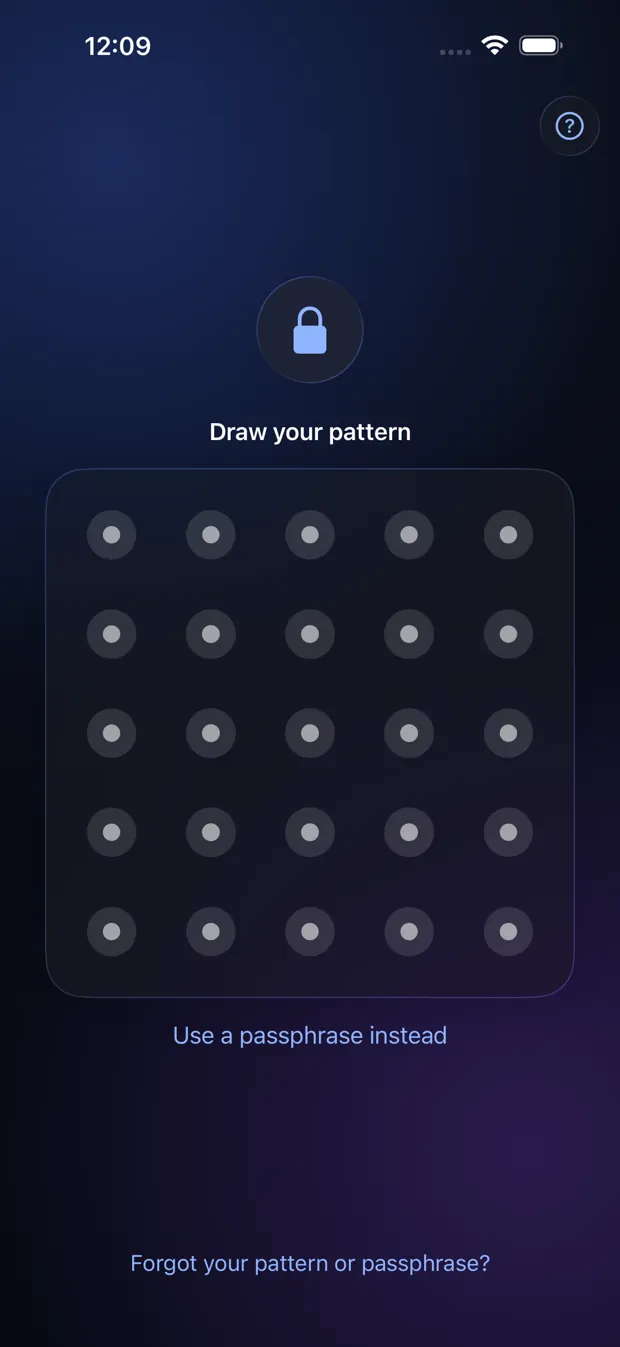
Step by step
- Draw your pattern, or tap “Use a passphrase instead” and type it.
- A pattern or passphrase that opens nothing shows an empty Vault. The screen never says “wrong”.
- After many wrong tries in a short time the app makes you wait, and the wait grows.
- Tap “Forgot your pattern or passphrase?” if you cannot remember.
Good to know
- The empty Vault is on purpose: if someone makes you open the app, there is nothing to show about what is inside.
- The app locks as soon as you leave it (you can choose a 15 or 60 second grace in Settings), when the phone locks, and after an idle time you choose in Settings.
Other topics
- Welcome to StrongRoom
- Choose how to unlock
- Your recovery phrase
- Unlocking
- Forgot your unlock?
- Your Vault
- Folders
- Viewing items
- Settings
- Change your unlock
- More than one Vault
- Duress Vault
- Recovery PIN
- Export and restore
- Share items
- Open a Share Package
- StrongRoom Pro
Coming to the App Store. See what version 1.0 includes.