Settings
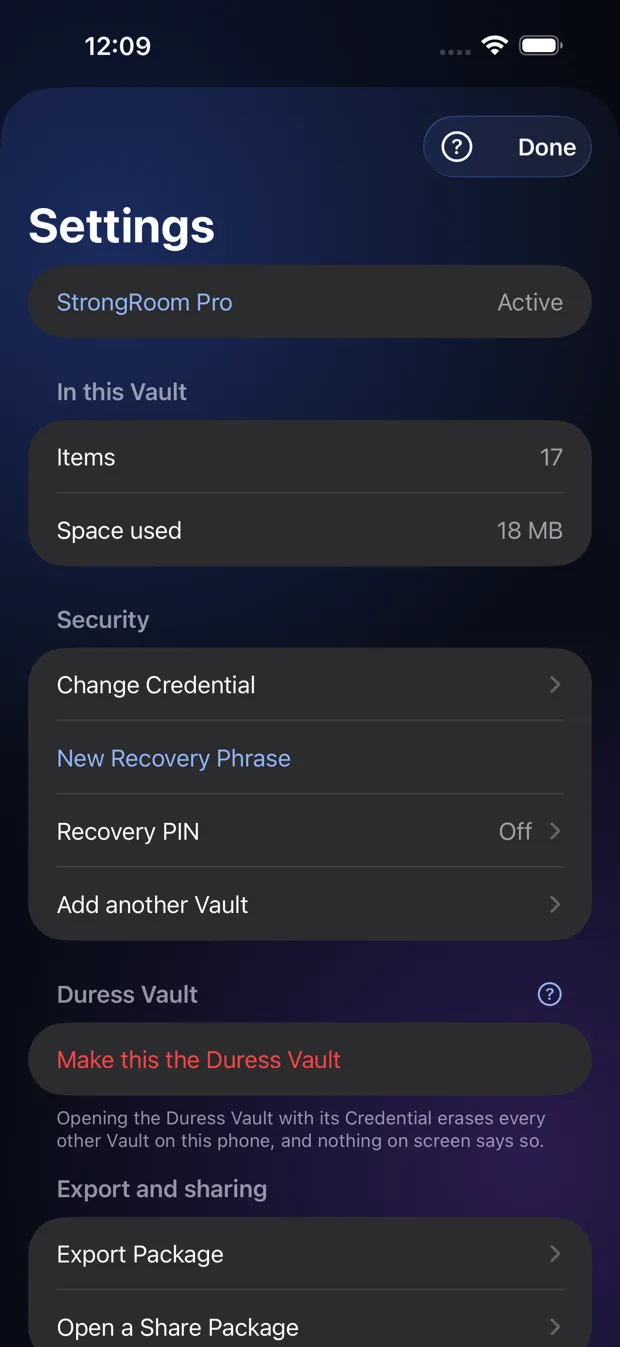
Change your unlock, set a Recovery PIN, export your Vault and choose when the app locks.
Step by step
- Change Credential replaces your pattern or passphrase.
- New Recovery Phrase makes a new set of 12 words and retires the old one.
- Export Package and Open a Share Package move encrypted files in and out.
- Lock when idle sets how long the app waits before it locks.
Good to know
- Add another Vault and the Duress Vault are Pro features. Free users see them with a Pro badge.
- Settings is available in an empty Vault too, but nothing changes there.
Other topics
- Welcome to StrongRoom
- Choose how to unlock
- Your recovery phrase
- Unlocking
- Forgot your unlock?
- Your Vault
- Folders
- Viewing items
- Settings
- Change your unlock
- More than one Vault
- Duress Vault
- Recovery PIN
- Export and restore
- Share items
- Open a Share Package
- StrongRoom Pro
Coming to the App Store. See what version 1.0 includes.