Folders, search and filters
Coming to the App Store. See what version 1.0 includes.
Free for iPhone. Pro is optional.
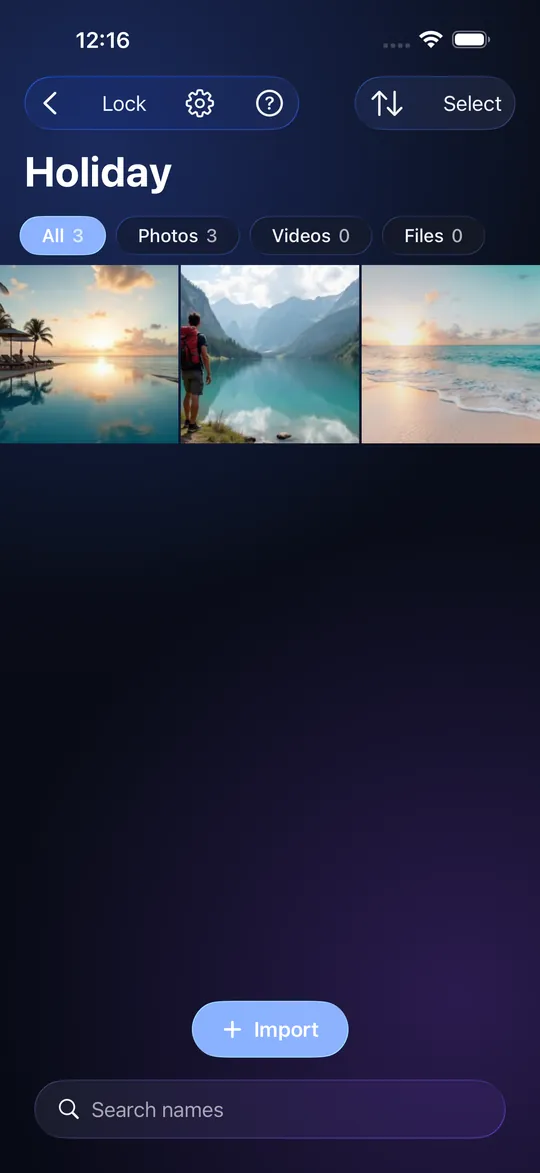
Folders, one level deep
Create a folder from the add menu, give it a name of up to 100 characters, and move items into it. An item lives in one folder, or at the top of the Vault. A Vault can hold up to 500 folders. Folders do not nest, which keeps the screen simple and the Export Package small. When you import while a folder is open, the new items go into that folder.
Filter by kind
Chips at the top of the Vault show Photos, Videos and Files, each with a count. Tap one to see only that kind. The All chip brings everything back. Chips for kinds you have none of are hidden.
Sort and search
Sort by newest, oldest, name or size. Search by name looks through every folder at once and shows the matches in one list; the filters still apply. Search runs inside the app on the decrypted index.
Move, select and delete
Press Select to pick several items, then move them to a folder, share them or delete them. Long-press an item to move it on its own. Deleting a folder never deletes its items; they return to the top of the Vault. Deleting an item asks you first.
Why folder names are private
Folder names, how many folders you have and which item is in which folder are stored in the Vault's encrypted index. Nobody without the credential can see them. An Export Package carries them. A Share Package does not; the person who receives it has not agreed to your way of sorting.
Limits
No folders inside folders. No manual drag-to-reorder. Sort is not remembered per Vault. Folders are not part of what you share. The free item limit (10 items) counts items, not folders.
Frequently asked questions
Does StrongRoom have folders?
Yes, one level deep, up to 500 per Vault.
Can I put a folder inside a folder?
Not yet.
Does search work across folders?
Yes, it searches the whole Vault and shows matches in a flat list.
Does deleting a folder delete my photos?
No. Its items go back to the top of the Vault.
Can people see my folder names?
Not without your credential. Folder names live inside the encrypted index.
Is this how I password-protect a folder?
Each Vault is protected as a whole, then you organise inside it. You can keep a Vault for work and another for personal.