Separate Vaults, and no list of them
Coming to the App Store. See what version 1.0 includes.
Free for iPhone. Pro is optional.
Pro feature
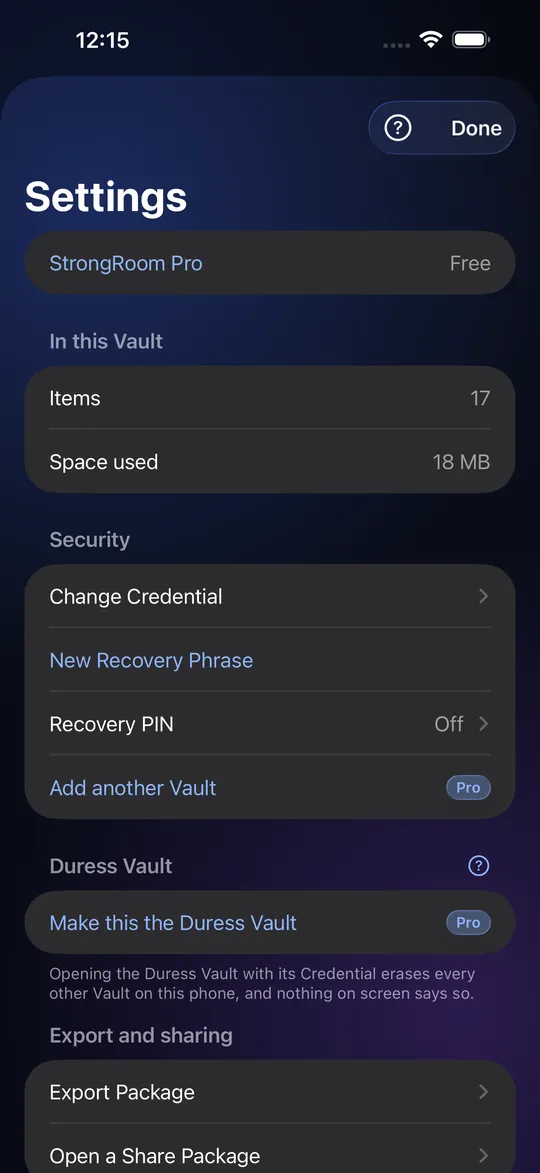
The free app has one Vault with up to 10 items. More than one Vault, each behind its own pattern or passphrase, is part of StrongRoom Pro (7-day free trial for new subscribers). Free users see "Add another Vault" in Settings with a Pro badge; tapping it explains and offers the upgrade. The Empty Vault below works in the free app. Anyone who already made extra Vaults keeps them if Pro lapses, and everything in a Vault stays openable, exportable and deletable.
One credential, one Vault
A Vault is a set of items together with the credential that opens it. With Pro, create another from Settings and give it a different pattern or passphrase. Open the app, draw one pattern, and that Vault opens. StrongRoom never shows a list of your Vaults, so someone looking over your shoulder sees only the one you opened.
What you see when a credential opens nothing
If you draw a pattern that matches no Vault, the app shows an empty Vault, the same screen as a real Vault with nothing in it. It never says "wrong pattern". Nothing is created or stored by opening it. The same is true of a mistyped passphrase. That also means a stranger cannot learn whether the pattern they tried was close.
A Vault you are willing to show
With Pro, a Decoy Vault is just an ordinary extra Vault you fill with items you do not mind revealing: ordinary photos, a few receipts. Use its pattern when someone demands to see your phone. It has no destructive behaviour. If you need one that also protects your other Vaults, see the Duress Vault (also Pro).
Up to 16 Vaults, all alike
The app stores Vaults in 16 fixed, identical-size slots. A slot is always present whether or not it holds a Vault, and empty slots are random data that look like full ones. Someone who copies the app's files sees 16 equal records, not a count of Vaults. The phone itself does keep a small record of which slots were used; see the limits page.
Limits
This hides Vaults from the screen and makes the files look alike. It does not stop an expert who examines your phone from finding a Vault, and it does not stop someone who forces you to reveal every credential. The app does not claim otherwise. A person with the phone and unlimited time can see that the app exists and is being used.
Frequently asked questions
Can I have more than one Vault?
With Pro, yes, up to 16, each with its own credential. The free app has one Vault (up to 10 items) and still shows an empty Vault for a credential that opens nothing.
What does a wrong pattern show?
An empty Vault, identical to a real Vault with nothing in it. No error message.
What is a Decoy Vault?
An ordinary Vault with harmless items that you reveal under pressure. It does nothing destructive.
Is a Decoy Vault the same as a Duress Vault?
No. A Duress Vault erases your other Vaults when it opens. A Decoy Vault only shows what is in it.
Can someone tell how many Vaults I have?
Not from the screen, and not from the files: they are 16 identical slots whether used or not. The phone does keep a small private record of which slots it has used, so that making a new Vault never overwrites an old one; an expert who extracts that record from an unlocked phone could learn how many Vaults were made, though not which Credential opens which. We do not claim it is impossible for an expert.
Is this free?
No, more than one Vault is a Pro feature. Free: one Vault, up to 10 items in total (photos, videos and documents together), plus recovery, folders, export and sharing.