Pattern or passphrase lock
Coming to the App Store. See what version 1.0 includes.
Free for iPhone. Pro is optional.
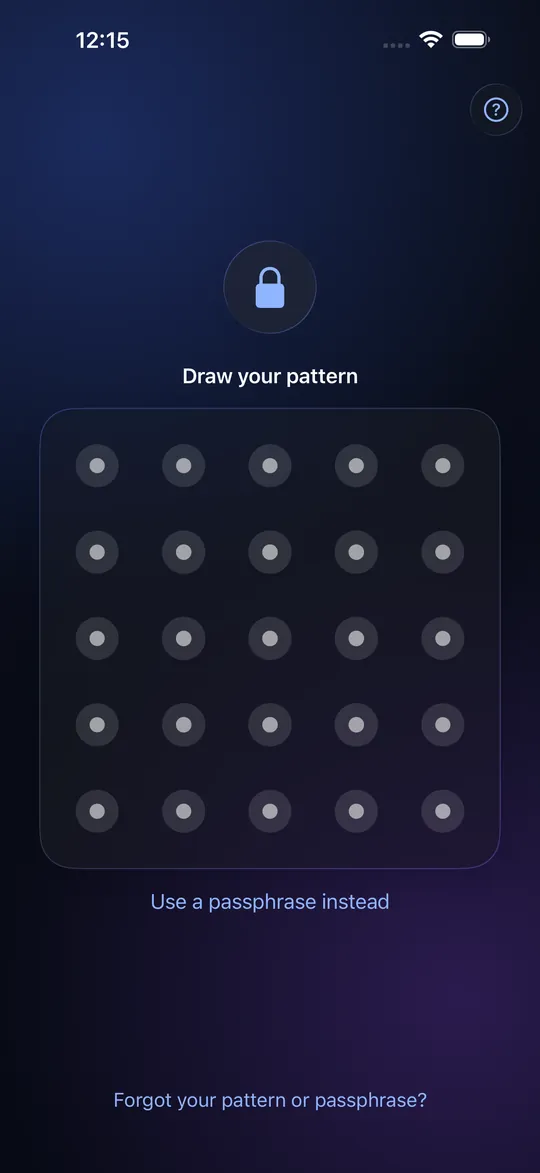
Two ways to open a Vault
When you create a Vault you choose a pattern or a passphrase. A pattern is quick to draw with a thumb. A passphrase is slower to type and much harder to guess. Both open the same kind of Vault, and you can switch from one to the other later.
How the pattern works
You draw a path across a 5 x 5 grid of dots. The path must touch at least six dots, may not repeat a dot, and must turn at least once. The app turns the path into a key, stretches it so each guess is expensive, and mixes in a secret held inside your iPhone's Secure Enclave. That secret never leaves the phone, so the same pattern drawn on a copy of the app's files elsewhere opens nothing.
Choosing a strong one
Longer paths with several turns beat short familiar shapes such as an L, a Z or your initial. Do not use a shape that leaves a smudge trail on the screen. If someone might really try to break in, use a passphrase of several unrelated words; it is the stronger choice and the app says so.
Why there is no Face ID
Face ID and Touch ID unlock one thing: the phone's idea of "you". A biometric button inside a vault app would open one particular Vault, and so would prove that it exists. StrongRoom leaves it out so that every credential, including one that opens nothing, looks the same on screen.
Changing it later
Settings has "Change Credential". Your files are not re-encrypted; the Vault's key stays the same and only the way to reach it changes.
Limits
A pattern has far fewer possibilities than a long passphrase. Guessing is slowed after ten tries in five minutes (see auto-lock and guess protection), but a pattern cannot be made as strong as a passphrase. Someone who watches you draw it once, or reads the smudge, can learn it. If you forget the credential, the Recovery Phrase or an optional Recovery PIN can set a new one on this phone.
Frequently asked questions
Is a pattern lock secure?
It suits everyday privacy from people nearby, because the key is stretched and tied to your phone, and guessing is slowed. It is weaker than a long passphrase, and shoulder-surfing is its main weakness.
Can I use Face ID to open StrongRoom?
No. A biometric would pick out one Vault and show it exists, so StrongRoom does not offer it.
What if I forget my pattern?
Use "Forgot?" with your Recovery Phrase, or a Recovery PIN if you set one. Without either, the Vault cannot be opened; nobody can reset it for you.
Can I change my pattern without losing my photos?
Yes. Your items are not re-encrypted; only the way in changes.
How many dots does the pattern need?
At least six, no repeats, and at least one turn.