Getting back in: Recovery Phrase and Recovery PIN
Coming to the App Store. See what version 1.0 includes.
Free for iPhone. Pro is optional.
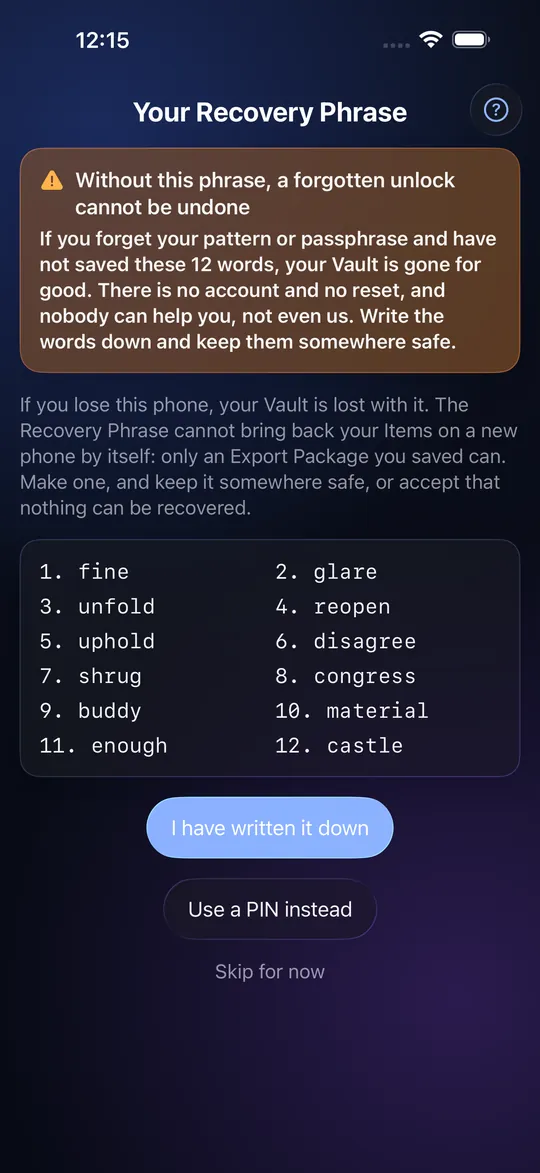
The 12-word Recovery Phrase
When you create a Vault, StrongRoom shows you 12 words, once. Write them on paper and keep them somewhere safe. If you forget your pattern or passphrase, tap "Forgot?" on the lock screen, type the words, and set a new credential. The phrase works together with a secret inside your phone, so on its own it opens nothing and the words cannot be used to read your files from another device. The same words also decrypt that Vault's Export Package on a new iPhone. The app keeps no copy, so it cannot show them again; you can generate a new phrase in Settings, which retires the old one.
The optional Recovery PIN
People who will not write twelve words down can add a Recovery PIN of 6 to 12 digits in Settings or during setup. It does one job: from "Forgot?" it lets you replace a forgotten pattern or passphrase on this phone. It is never a way to unlock on the lock screen. We tell you plainly that it is weaker than the phrase: six digits allow a million guesses, whereas twelve random words have far too many combinations to guess in practice. It is tied to this phone's Secure Enclave and every attempt counts in the guess limit, so someone without your phone cannot try it and someone with it is slowed to a few guesses an hour after ten. It cannot open an Export Package on a new phone.
Which to use
Use the phrase if you want the strongest option and the ability to restore on a new phone. Add the Recovery PIN as well if you worry about forgetting the pattern and not having the paper to hand. Skipping both is allowed; the app reminds you three times.
Step by step: recover a forgotten pattern
- Open StrongRoom and tap "Forgot your pattern or passphrase?".
- Choose the phrase or the PIN.
- Type the 12 words exactly (English words, any app language) or the digits.
- Choose a new pattern or passphrase for that Vault.
- Your items are exactly as you left them.
What neither can do
They do not recover a Vault from a lost or wiped phone; for that you need an Export Package and the phrase. A mistyped phrase or a PIN that breaks the rules does not count as an attempt; a well-formed wrong one does. There is no hint stored, and no one at StrongRoom can reset anything for you.
Frequently asked questions
I forgot my pattern. Can I get my photos back?
Yes, if you have the Recovery Phrase (or a Recovery PIN) and the same phone. Otherwise no one can open the Vault.
Can StrongRoom show me my phrase again?
No. It is shown once and the app keeps no copy.
Is the Recovery PIN as secure as the phrase?
No. It is easier to remember and easier to guess. It is also bound to this phone and slowed by the guess limit.
Can the Recovery PIN unlock my Vault from the lock screen?
No. It works only from "Forgot?" and only to set a new pattern or passphrase.
Is the phrase a crypto wallet seed?
No. The words come from a standard word list but do not open any wallet, and a wallet's words do not open a Vault.
Are the words translated?
No. They are always the English list so that a phrase works on any phone and in any app language.