Duress Vault
Pro feature
The Duress Vault is part of StrongRoom Pro, because it needs a second Vault to erase. In the free app it is shown in Settings with a Pro badge; tapping it explains what it does and offers the upgrade, with a 7-day free trial for new subscribers. Anything already in a Vault stays openable, exportable and deletable with or without Pro.
What it does
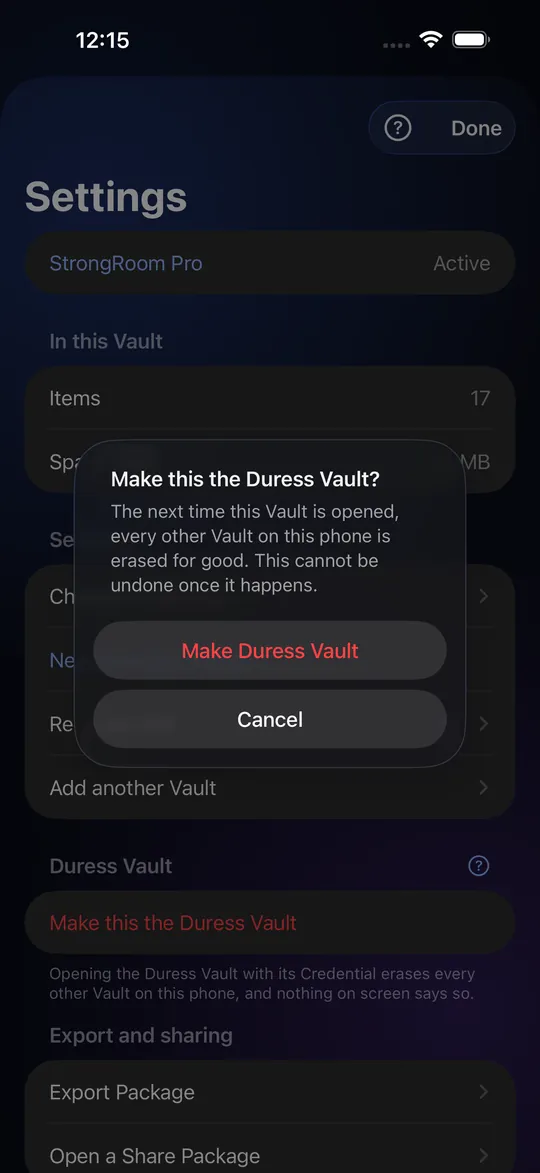
A Duress Vault is a Vault you flag in Settings. It opens like any other Vault. The moment it opens with its own pattern or passphrase, StrongRoom erases every other Vault on this phone, and nothing on screen says so. What the person sees is a Vault of ordinary items.
Who it is for
People who might be forced to unlock their phone and who would rather lose their data than hand it over: someone crossing a border, a journalist, someone in an unsafe home. It is a last resort, not an everyday setting.
What happens, step by step
(1) You make a Vault and fill it with things that look believable. (2) In Settings you choose "Make this the Duress Vault" and confirm the warning. (3) Later, opening that Vault with its credential destroys the keys of every other Vault on the phone. The data is crypto-erased: without its keys, it cannot be read, even by us. (4) The attempt log is cleared.
What it does not do
It does not delete anything stored outside StrongRoom, such as originals you kept in Photos or an Export Package you saved. It cannot prove to anyone that the other Vaults never existed. Someone who has seen the app before, or who reads the phone's files, may suspect. In some places, destroying data when asked to unlock a device can itself be an offence; this is not legal advice, and you should know your local law.
There is no undo
There is no cloud copy, so a Duress wipe is final. The only way back is an Export Package you made earlier and kept elsewhere, together with that Vault's 12-word Recovery Phrase. Make your Export Packages before you rely on the Duress Vault. Read whether the Duress Vault is legal before you turn it on.
What you get without Pro
The free app has one Vault with up to 10 items. A pattern or passphrase that opens nothing shows an empty Vault, so the screen never says "wrong", and that works with one Vault. Recovery Phrase, Recovery PIN, Export Package and the attempt log are free. Without Pro you cannot make a second Vault or a Duress Vault.
Setting it up safely
Use a pattern or passphrase that you will not draw by accident. Test the Decoy behaviour with a throwaway Vault first, not with your real ones. Tell nobody the credential. Remember that a Duress Vault is a normal Vault in every other respect: it has no special icon and nothing marks it.
Frequently asked questions
What is a Duress Vault?
A Vault that, when opened, erases all your other Vaults on that phone without any message.
Is it free?
No. The Duress Vault is a StrongRoom Pro feature, because it needs a second Vault to erase. The free app has one Vault with up to 10 items, plus the Empty Vault, recovery and export. Pro has a 7-day free trial for new subscribers.
Can I undo a Duress wipe?
No. Only an Export Package you saved earlier, plus its Recovery Phrase, can restore a wiped Vault.
Will the person see that something was erased?
The app shows nothing. We do not claim a forensic examiner could not tell.
Is it legal to use?
It depends on where you are and on who is asking. This is not legal advice; check your local rules.
How is it different from a Decoy Vault?
A Decoy Vault only shows harmless items. A Duress Vault also erases the others.