Import and scan photos, videos and files
Coming to the App Store. See what version 1.0 includes.
Free for iPhone. Pro is optional.
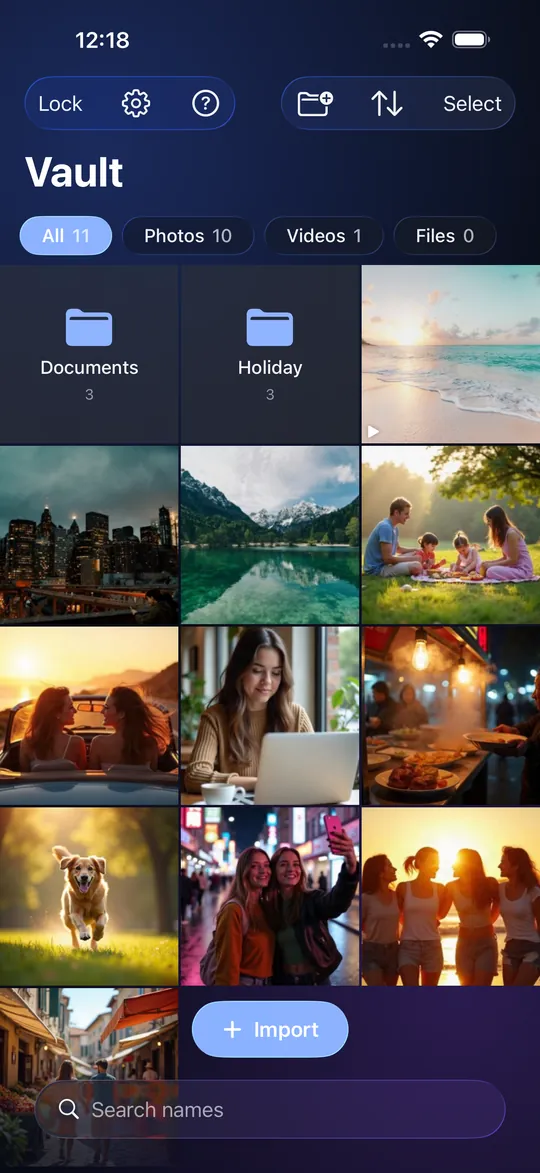
From your photo library
Tap the add button and choose "Photos and Videos". iOS shows its own picker; StrongRoom receives only the items you tick and never sees the rest of your library. The app shows "Importing 3 of 10" while it works. Items keep the order you picked them.
From Files, any file type
Choose "Files" to import documents, PDFs, scans, spreadsheets, archives or anything else the Files app can open, including items from other storage providers you have set up in Files. Several at a time is fine.
Scan a document
Tap the add button and choose "Scan a document". Apple's document scanner opens, finds the page edges and captures the pages; StrongRoom makes them into one PDF Item and encrypts it into the Vault. The scan is never written to Photos or the camera roll. It is free for everyone and counts as one Item toward the free limit of 10 Items in total. It works on iPhone only and needs the iPhone's camera. How a scan looks depends on the lighting and on Apple's scanner, and StrongRoom does not promise a particular quality. It does not read the text in a scan or make it searchable.
Delete the originals (optional)
After an import from Photos, StrongRoom can ask iOS to delete the originals from your library. It asks every time, never silently, and iOS asks you to confirm. Photos keeps deleted items in Recently Deleted for 30 days, so the copy is not gone from your library until then. Clear Recently Deleted yourself if that matters. Photos that iOS will not delete, such as ones synced from a computer, stay.
Quality and size
Photos, videos and files you import are stored as they are. StrongRoom does not recompress them to save space. Photos taken with the in-app camera, and pages from Scan a document, are made by the app: the camera saves JPEGs and the scanner saves a PDF. Imported photos and videos are named by date and time (for example "Photo 2026-10-27 14.03 1"); files from Files keep their names. Photos taken with the in-app camera are saved as high-quality JPEGs with no location data. A big library takes a lot of space on the phone; the Settings screen shows how many items and how much storage a Vault uses.
Free limits
The free app has one Vault that holds up to 10 items in total (photos, videos and documents together). An import that would pass the limit adds nothing and offers Pro. Items already in a Vault stay available.
Limits
No share-sheet import from other apps and no drag and drop yet. No automatic import. A photo stored in iCloud Photos must finish downloading before import. Importing does not remove metadata such as location from photos; the file is kept as it is.
Frequently asked questions
Does the app see my whole photo library?
No. It sees only what you pick in the iOS picker.
Can it delete the originals?
Yes, if you let it, every time. Photos keeps them in Recently Deleted for 30 days.
Can I import PDFs and other files?
Yes, any file from Files.
Is image quality reduced?
StrongRoom does not recompress photos, videos or files you import; it stores the file it is given, encrypted. Photos from the in-app camera are saved as JPEGs and scans as PDFs.
Does importing remove location data?
No. The file is stored unchanged.
Can I import from the share sheet in another app?
Not yet.
Can I scan a document into the Vault?
Yes. Tap the add button, choose Scan a document, and the pages are saved as one encrypted PDF. It is free, needs an iPhone camera and counts as one Item toward the free limit.