Share Package: send items without sending them in the clear
Coming to the App Store. See what version 1.0 includes.
Free for iPhone. Pro is optional.
How it works
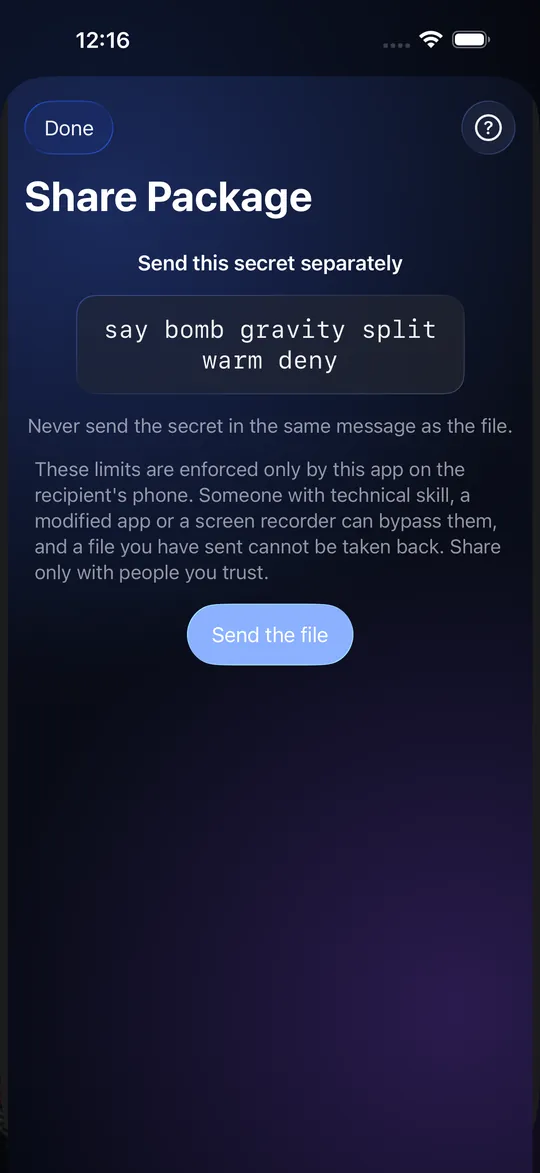
Select some items, choose Share, and StrongRoom makes an encrypted file, the Share Package. You send that file any way you like: AirDrop, Messages, email, a link to a file you host. Then you send the key separately, as six words or as a QR code. The other person needs StrongRoom to open it. The package opens read-only; they can look, and you decide whether they may add the items to their own Vault.
Step by step: send
- Select the items and tap Share.
- Choose how it opens: six words or a QR code.
- Optionally limit how many times it can be opened (1 to 100) and set an expiry date and time.
- Choose whether the recipient may add the items to their Vault.
- Make the package and send the file.
- Send the six words or the QR code by another route. The app reminds you never to send it in the same message as the file.
Step by step: open
In Settings choose "Open a Share Package", pick the file, type the six words or scan the QR code, and open it. The app shows how many opens are left. If the sender allowed it, "Add all to my Vault" copies the items in.
The limits you can set
Open count, expiry, and whether the items may be added to the recipient's Vault. Nothing needs an account, an iCloud sign-in or a network connection of its own. You do not need Pro to create a Share Package.
What the limits can and cannot stop
The open count and expiry are enforced only by the StrongRoom app on the recipient's phone. Someone with technical skill, a modified app or a screen recorder can get around them, and a file you have sent cannot be taken back. A recipient can also photograph their screen. Share only with people you trust. Anyone who has both the file and the six words (or the QR code) can open it, so send them by different routes.
Share Package or Export Package
A Share Package sends chosen items to another person and does not include folders. An Export Package is a whole Vault for you, to restore on a new phone. They are different files with different keys.
Frequently asked questions
How do I share photos securely from StrongRoom?
Make a Share Package, send the file, and send the six words or QR code through a different route.
Does the recipient need the app?
Yes, StrongRoom, to open the package.
Can I stop them opening it again?
You can set an open count and an expiry, but they are enforced only by the app on their phone and can be bypassed by someone skilled.
Can I take a share back?
No. Once the file is sent, it cannot be recalled.
Does it need iCloud or an account?
No, and the app makes no network connection to send it.
Do I need Pro?
No.